"There was a time when everything was moving towards the desktop. This Internet thing was new and cool, but there was no way it would ever last. And no one knew how to code for the web, at least not anything beyond animated lava lamps and cute "Under Construction" images. So, to make coding for the web easier, they made ASP.NET to be just like coding for a desktop, using the same patterns, the same event-based model, and the same stateful approach. But the web isn't stateful, its only events are GET and POST, and is nothing like a desktop, so we tortured ourselves for years forcing a square peg through a round hole. The time has come for redemption, and its name is ASP.NET MVC. Spend an hour discovering how coding for the web is supposed to be--how it is today--and end your misery. Salvation awaits." At various user groups throughout Southeast Michigan and Northwest Ohio, I have been presenting this topic since the last quarter of 2009. For those that are interested, I have made the slide deck available on SlideShare. The code demo used during the talk is available as a walkthrough via one of my installments of Learn to Code, where you can create, step-by-step, the same ASP.NET MVC 2 application as was built during the presentation. If you attend one of my presentations for this topic, I would appreciate your feedback. If you are willing to tolerate a small registration process, SpeakerRate will allow you to give feedback and anonymous ratings to the session you attended. If you are interested in having me present this topic at your user group or conference, please contact me. Past presentations on this topic: Rate – Ann Arbor .NET Developers, Ann Arbor, Michigan, May 2010
Rate – GLUGnet, Lansing, Michigan, March 2010
Rate – A2<DIV>, Ann Arbor, Michigan, February 2010
Rate – NWNUG, Toledo, Ohio, February 2010
Rate – GLUGnet, Flint, Michigan, February 2010
This Saturday, August 1st, I will be speaking at Lansing Day of .NET 2009, at the Breslin Student Events Center at Michigan State University, East Lansing, Michigan. This session will be the same ASP.NET Page Life Cycle talk that I gave last month at CodeStock. Dev Basics: The ASP.NET Page Life Cycle Jay Harris / Session Level: 100
When a request occurs for an ASP.NET page, the response is processed through a series of events before being sent to the client browser. These events, known as the Page Life Cycle, are a complicated headache when used improperly, manifesting as odd exceptions, incorrect data, performance issues, and general confusion. It seems simple when reading yet-another-book-on-ASP.NET, but never when applied in the real world. In this session, we decompose this mess, and turn the Life Cycle into an effective and productive tool. No ASP.NET MVC, no Dynamic Data, no MonoRail, no technologies of tomorrow, just the basics of ASP.NET, using the tools we have available in the office, today. If you can make it, I recommend attending LDODN09. There are some great sessions lined up, and it is all being provided free-of-charge (though the event organizers are encouraging donations). Last year's event, held at Lansing Community College, was the first Lansing Day of .NET and the first event that I was involved in organizing. It went well, and from the moment it was over I was looking forward to the next one. I'm not on the organizing committee this year, but I am still sure that this one is destined to be great as well. They rented the Breslin Center! If I knew nothing else, that would be enough. So come out to Lansing Day of .NET this Saturday. Registration is still open. I hope to see you there.
I enjoy being a speaker. I have learned a lot through my mentors, colleagues, and through other community speakers, and standing before a group of my peers and sharing my knowledge is one way that I can give back to the development community. By linking together my speaking and my blog, I can provide a central repository for the slide decks and demo code for my sessions and make these things available to the audience for further review. Here, you will find all of my slides and code for all past presentations, as well as information about all my past and future talks. This post will also be linked through my top navigation so that it can be easily found, and will also be regularly updated with any new schedules and slide decks.
Thank you to everyone who as attended any of my sessions, and as always, I encourage you to give me any feedback you have via SpeakerRate.
Upcoming Talks
I would love to speak at your meeting, event, user group, or conference; please feel free to contact me if you are interested.
.NET Users of Fort Wayne (NUFW), July 10, 2012
On July 10th, 2012, I will be presenting at the July meeting of the .NET Users of Fort Wayne (NUFW) in Fort Wayne, Indiana. The meeting's session will be "Your Spark Razored by NHaml: A Comparison of Popular ASP.NET MVC View Engines." | Event Site
St. Louis Days of .NET, August 3 & 4, 2012
On August 3rd-4th, 2012, I will be presenting two sessions at the St. Louis Days of .NET in St. Louis, Missouri. My sessions at the conference will be "Going for Speed: Testing for Performance” and “XCopy is Dead: .NET Deployment Strategies that Work." | Event Site
That Conference, August 12-14, 2012
I will be presenting at That Conference, a developer's conference in Wisconsin Dells, Wisconsin, held August 12th through the 14th. I will be presenting "Serious Business with Node.js: Module Development." | Event Site
DevLink Technical Conference, August 29-31, 2012
At the DevLink Technical Conference, held in Chattanooga, Tennessee on August 29-31, I will be presenting three sessions covering development in Orchard and in node.js. The presentations will be "Serious Business with Node.js: Module Development," "Serious Business with Node.js: TDD for Node," and "Serious Business with OrchardCMS: Module Development." | Event Site
Presentations
ASP.NET MVC: A (Microsoft) Web Coder's Salvation
There was a time when everything was moving towards the desktop. This Internet thing was new and cool, but there was no way it would ever last. And no one knew how to code for the web, at least not anything beyond animated lava lamps and cute "Under Construction" images. So, to make coding for the web easier, they made ASP.NET to be just like coding for a desktop, using the same patterns, the same event-based model, and the same stateful approach. But the web isn't stateful, its only events are GET and POST, and is nothing like a desktop, so we tortured ourselves for years forcing a square peg through a round hole. The time has come for redemption, and its name is ASP.NET MVC. Spend an hour discovering how coding for the web is supposed to be--how it is today--and end your misery. Salvation awaits.
Slides | Code Walkthrough
Previous Sessions
Grand Rapids, Michigan | GRDevDay developer's conference | November 2011
Okemos, Michigan | Lansing Day of .NET | June 2011 | Event Site
Cincinnati, Michigan | Cincinnati .NET User Group | March 2011 | SpeakerRate
Cincinnati, Michigan | Cincinnati Financial (Internal User Group) | March 2011 | SpeakerRate
Kalamazoo, Michigan | Microsoft Developers of Southwest Michigan | September 2010 | SpeakerRate
Louisville, Kentucky | Kentucky .NET User Group | July 2010
Ann Arbor, Michigan | Ann Arbor .NET Developers | May 2010 | SpeakerRate
Lansing, Michigan | Greater Lansing User Group for .NET Developers | March 2010 | SpeakerRate
Ann Arbor, Michigan | A2<div> | February 2010 | SpeakerRate
Toledo, Ohio | North West Ohio .NET User Group | January 2010 | SpeakerRate
Flint, Michigan | Greater Lansing User Group for .NET Developers | January 2010 | SpeakerRate
Dev Basics: The ASP.NET Page Life Cycle
When a request occurs for an ASP.Net page, the response is processed through a series of events before being sent to the client browser. These events, known as the Page Life Cycle, are a complicated headache when used improperly, manifesting as odd exceptions, incorrect data, performance issues, and general confusion. It seems simple when reading yet-another-book-on-ASP.NET, but never when applied in the real world. In this session, we decompose this mess, and turn the Life Cycle into an effective and productive tool. No ASP.NET MVC, no Dynamic Data, no MonoRail, no technologies of tomorrow, just the basics of ASP.NET, using the tools we have available in the office, today.
Slides | Code
Previous Sessions
Ann Arbor, Michigan | Ann Arbor Day of .NET | May 2010 | SpeakerRate | Event Site
Flint, Michigan | Greater Lansing User Group for .NET Developers | September 2009 | SpeakerRate
Lansing, Michigan | Lansing Day of .NET developer's conference | August 2009 | SpeakerRate | Event Site
Knoxville, Tennessee | CodeStock 2009 developer's conference | June 2009 | SpeakerRate | Event Site
Bullets Kill People: A Presenter's Guide to Better Slides
Effective communication is a pivotal component of a success. Be it presenting at a user group, assisting with a Sales demo, or simply justifying to your boss the purchase of Visual Studio upgrades, you will give a presentation in your career. But the effectiveness of your presentation is not just about being well-spoken and having a prepared outline; the quality of a slide deck has as much impact on a presentation as the quality of the speaker. Slides can destroy. Slides can invigorate. Slides can shape the mood of your audience and bend it at will. Learn to harness this power; use it to tell your story effectively, persuasively, and leave your audience inspired.
Previous Sessions
Louisville, Kentucky | CodePaLOUsa | March 2012 | Event Site
New York, New York | Code Camp NYC 2011.2 developer's conference | October 2011 | Event Site
Hampton Roads, Virginia | MADExpo 2011 developer's conference | July 2011 | Event Site
Knoxville, Tennessee | CodeStock 2011 developer's conference | June 2011 | Event Site
Continuous Integration: More than just a toolset
Does your team spend days integrating code at the end of a project? Continuous Integration can help. Using Continuous Integration will eliminate that end-of-project integration stress, and at the same time will make your development process easier. But Continuous Integration is more than just a tool like CruiseControl.Net or TeamCity; it is a full development process designed to bring you closer to your mainline, increase visibility of project status throughout your team, and to streamline deployments to QA or to your client. Find out what Continuous Integration is all about, and what it can do for you.
Slides
Previous Sessions
Hampton Roads, Virginia | MADExpo 2011 developer's conference | June 2011 | Event Site
Columbus, Ohio | Central Ohio .NET Developers Group | March 2011 | SpeakerRate
Nashville, Tennessee | DevLink Technical Conference | August 2010 | SpeakerRate | Event Site
Wilmington, Ohio | Central Ohio Day of .NET | June 2010 | SpeakerRate | Event Site
Lansing, Michigan | Michigan Department of IT | December 2009 | SpeakerRate
Lansing, Michigan | Greater Lansing User Group for .NET Developers | November 2009 | SpeakerRate
Southfield, Michigan | Great Lakes Area .NET User Group | January 2009 | SpeakerRate
Toledo, Ohio | North West Ohio .NET User Group | January 2009
Sandusky, Ohio | CodeMash 2009 developer's conference | January 2009 | SpeakerRate | Event Site
Ann Arbor, Michigan | Ann Arbor .NET Developers | October 2008
Flint, Michigan | Greater Lansing User Group for .NET Developers | September 2008
The Geek's Guide to SEO
So, you have a web site. Your own soapbox to the world. As a developer, it seems easy for us to claim a spot on the world wide web, set up shop, customize the look and feel, and throw up some content. The hard part is attracting people to your new little flag in the sand. Hey, we majored in Computer Science, not Marketing. But there is hope: one hour of tips, tricks, and general how-to about promoting your site using programming, power toys, and other technical prowess. Our discussion will include ways to attract and appeal to search engine spiders using better tools that are freely available and better code that doesn't include learning new languages or frameworks.
Previous Sessions
Hampton Roads, Virginia | MADExpo 2012 developer's conference | June 2012 | Event Site
Toledo, Ohio | North West Ohio .NET User Group | October 2011
Knoxville, Tennessee | CodeStock 2011 developer's conference | June 2011 | Event Site
Nashville, Tennessee | DevLink Technical Conference | August 2010 | SpeakerRate | Event Site
Going for Speed: Testing against Performance Expectations
Unit Testing has settled into the mainstream. As developers, we write code that checks code, ensuring that the outcome matches some expected result. But, are we really? As end-users (which includes each one of us from time to time), when we ask a question, we don't just expect our answer to be right, we expect it to be right now. So as developers, why are we only validating for accuracy? Why aren't we going for speed? During this session we'll discuss meeting the performance needs of an application, including developing a performance specification, measuring application performance from stand-alone testing through unit testing, using tools ranging from Team Foundation Server to the command line, and asserting on these measurements to ensure that all expectations are met. Your application does "right." Let's focus on "right now."
Previous Sessions
Pittsburgh, Pennsylvania | Pittsburgh Tech Fest | June 2012 | Event Site
Louisville, Kentucky | CodePaLOUsa | March 2012 | Event Site
Grand Rapids, Michigan | West Michigan .NET Users Group | September 2011 | Event Site
Dayton, Ohio | Dayton .NET Developers Group | March 2011 | SpeakerRate
Sandusky, Ohio | CodeMash 2.0.1.1 | January 2011 | SpeakerRate | Event Site
Grand Rapids, Michigan | Grand Rapids Day of .NET | October 2010 | SpeakerRate | Event Site
Cincinnati, Ohio | CINNUG Software Quality Fire Starter | October 2010 | SpeakerRate
Nashville, Tennessee | DevLink Technical Conference | August 2010 | SpeakerRate | Event Site
XCopy is Dead: .NET Deployment Strategies that Work
Back in 1995, when we first started deploying web sites, the copy command was enough. Our web sites only consisted of a static HTML file and a few graphics of animated lava lamps. But our systems are more complex now; instead of a dozen files being uploaded through FTP to a single web server, we have hundreds of files spread across multiple load-balanced web servers, dozens of applications interwoven in a tiered server architecture, and an expectation that it can be deployed error-free without impacting our stringent SLAs. When a tool is no longer sufficient to perform the task at hand, it is time to find a better tool. XCopy is dead; it is time for strategies that work.
Previous Sessions
Knoxville, Tennessee | CodeStock 2012 developer's conference | June 2012 | Event Site
Chattanooga, Tennessee | DevLink 2011 Technical Conference | August 2011 | Event Site
Serious Business with node.js: Module Development
JavaScript has left the browser and is prowling on the server. No longer just for image rollovers and AJAX, Node.js has given JavaScript a new resurgence as a server-side language with a platform for creating lightweight networked applications. In this session, we will move beyond Node’s base web servers and Twitter applications, and into module development: those small, reusable components that are the foundation for every business application on every platform. Learn how to create a module within Node.js, how to test your module and validate functionality, and how to get your creation distributed into the wild.
Previous Sessions
Hampton Roads, Virginia | MADExpo 2012 developer's conference | June 2012 | Event Site
Knoxville, Tennessee | CodeStock 2012 developer's conference | June 2012 | Event Site
Serious Business with node.js: TDD for node
If you don’t test it, how do you know it works? Over the past few years, we have been compelled to write unit and integration tests for our applications--code that validates code--and it is these tests that change a one-off tool into a well-architected, robust, business-ready application. Yet, every new framework requires a new testing framework, so in this session, we will discuss testing frameworks for node.js. You will walk away with a solid understanding of how to write tests against your node.js applications and modules, leading to confidence that your work is business-ready.
Serious Business with OrchardCMS: Module Development
So, you need a Content Management System on the .NET framework. While your business might spend wheelbarrows of money on a platform that is powerful and extensible, your personal site would abandon extensibility for a free, open-source solution. But what if we had an option that was free and powerful and extensible? We do: OrchardCMS. Since we already know that Orchard is free, in this session we will discuss the power of Orchard’s CMS engine. You will learn how to build new modules for the Orchard platform, allowing you to extend functionality as you see fit to meet the needs of your site, your business, and customers.
Your Spark Razored my NHaml: A Comparison of Popular ASP.NET MVC View Engines
If you've worked with ASP.NET MVC, you've likely worked with the WebFormsViewEngine, and have felt like you've stepped back 10 years into Classic ASP 3.0. But one of the powers of ASP.NET MVC is its flexibility to use other View Engines, allowing you to to keep the same Model and Controller while using code in your Views that doesn't bring back scary memories of COM. Spark, Razor, and NHaml are all View Engines that have each made a statement in ASP.NET MVC. Let's see what they are all about, how they compare, and how they stack up to the WebForms engine.
Previous Sessions
Indianapolis, Indiana | Indianapolis .NET Developer's Association | May 2012
Pittsburgh, Pennsylvania | Pittsburgh .NET Users Group | April 2012 | SpeakerRate | Event Site
Findlay, Ohio | Findlay Area .NET User Group | November 2011
Chattanooga, Tennessee | DevLink 2011 Technical Conference | August 2011 | Event Site
Next month, I will be speaking at CodeStock, a developer conference in Knoxville, Tennessee, held June 26-27. We will be discussing the ASP.NET Page Life Cycle, to help get over the fears and troubles with validation, event handing, data binding, and the conflicts between page load and page initialization. Dev Basics: The ASP.NET Page Life Cycle Jay Harris / Session Level: 100
When a request occurs for an ASP.NET page, the response is processed through a series of events before being sent to the client browser. These events, known as the Page Life Cycle, are a complicated headache when used improperly, manifesting as odd exceptions, incorrect data, performance issues, and general confusion. It seems simple when reading yet-another-book-on-ASP.NET, but never when applied in the real world. In this session, we decompose this mess, and turn the Life Cycle into an effective and productive tool. No ASP.NET MVC, no Dynamic Data, no MonoRail, no technologies of tomorrow, just the basics of ASP.NET, using the tools we have available in the office, today. It's a long drive from Michigan to Knoxville, but the conference is worth the trip (the first of two Tennessee conferences I will be attending this year). A few other local speakers will be making the trip to Knoxville, as well. Check out the full session list for more information, and while you are at it, register for the event if you haven't already done so; the cost is only $25 if you sign up before the end of May. I was there last year for the first CodeStock, and I had a great time; I'm excited about this years event, not only because I am speaking, but to see what other new things that people are talking about, catch up with friends, and to meet new people in the community. I hope to see you there.
Increasing or decreasing the font size of your code in Visual Studio's text editor is almost required whenever VS is fired up on a projector. Anyone who has had to demo code, or give a talk at a user group, or present new technologies to their team has experienced the pain of increasing the font size through the Tools -> Options menu, followed by an inquiry to the crowd: "How's that? Is this font size readable by everyone?" Often times the selected size is not quite the right solution, and the process is repeated. Life as a presenter would be easier if only you could modify the font size through a simple keyboard command, similar to how browsers enable you adjust the font through the ctrl+ and ctrl- commands. Macros.Samples.Accessibility.DecreaseTextEditorFontSize
Decreases the text editor font size in Visual Studio Macros.Samples.Accessibility.IncreaseTextEditorFontSize
Increases the text editor font size in Visual Studio Fortunately, this is easy with the help of Visual Studio's Sample Macros. To help show you the ropes of writing custom macros, VS ships with a collection samples, and two of these samples respectively increase and decrease the font size of the text editor. Right out of the box, Visual Studio comes with the ability to modify the font size for your code; all that remains is mapping these macros to the keyboard. 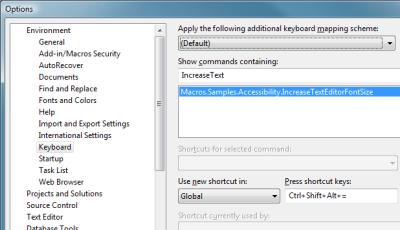 Mapping to the Keyboard Mapping to the Keyboard
Anchoring these macros to specific keyboard commands is a simple process. - From Visual Studio, access the Tools -> Options menu.
- In the Options window, navigate to Environment -> Keyboard.
- Using the "Show commands containing" input, enter in IncreaseText or DecreaseText. The list of available commands will automatically filter as you type, reducing the list to the applicable macro.
- Select the macro command, and select the "Press shortcut keys" input, and enter your desired keyboard command. Click the Assign button to set the command. I use "Ctrl, Alt, Shift, =" (plus) and "Ctrl, Alt, Shift, -" for my Increase and Decrease commands, respectively.
Last week was CodeMash 2009, a developer's conference in Sandusky, Ohio. The conference, which lasted from Wednesday, January 7th, through Friday, January 9th, was held at the Kalahari Resort, a hotel and indoor water park; this makes the conference unique, as families are able, and encouraged, to join the attending developer for the week, and while the developer is off learning about the Next Big Thing, the significant others, spouses, and children are off enjoying the fun of the water park. As for the conference itself, it is billed as an event where opposing developer communities congregate and mash together. Attendees are encouraged to exit their comfort zone—.Net developers can attend sessions on Java or Ruby; Java developers can attend sessions on Azure or .Net—allowing a seasoned developer to get a new perspective, and allowing communities to cross-pollinate ideas and practices. This was not only my first CodeMash as a speaker, but also as an attendee, and it will not be my last. Day Zero (The Precompiler) As Brian Prince points out, we developers love to start lists with zero. It's cool, now that we no longer think digital watches are a pretty neat idea. Day Zero at CodeMash was the Precompiler, an optional extra day of sessions that was new feature of the 2009 event. Unlike the conference's traditional hour-long sessions, the precompiler is split into two half-day sessions, allowing attendees to take a deep dive into a particular topic. For me, it was a dive into Ruby by Joe O'Brien and Jim Weirich and into Windows Azure with David Aiken. In the Ruby session, @objo and @jimweirich used "koans" to teach Ruby to the attendees. Effectively, these koans were unit tests coded in Ruby against the Ruby language. Each test purposefully failed, and the process of correcting the code of the each test progressively taught more and more about the ruby language. The tests begin with assert false which must be converted to assert true to pass, and proceeds through conditionals, strings, arrays, hashes, blocks, and beyond. Ingenious. In the Azure session, @thedavidaiken, the evangelist for the Azure platform, gave a once-over and code demo to Azure. After this talk, I'm very excited about playing in the Azure sandbox, and have been brainstorming for a good topic. I have since gotten my invite into the Azure CTP, and should be making sand castles, soon. Other precompiler sessions were available, including 101-level sessions on iPhone development, Java, and more, and what I have only heard described as a phenomenal talk by Mary Poppendieck on Value Stream Mapping. Also, an all day CodeJam allowed any of the attendees to pop in and code with their friends, colleagues, and other attendees. I wish I could have cloned myself, and attended some of these other sessions. Day One After a night that included a few hours of water park slides followed by a few hours catching up with people I hadn't seen since DevLink 2008 or last fall's Ann Arbor Day of .Net, the conference officially kicked off with breakfast and a fantastic keynote by Venkat Subramanian. Then it was off to a day of sessions and Open Spaces, split by a keynote by Mads Torgersen during lunch. I attended Jeff Blankenburg's A Lap Around the Live Framework and Mesh Services talk, and stopped in to Bryan Weber's Functional Concepts for OOP Developers talk for a bit, all in between preparing for my talk. The Open Spaces, where this year's theme was Techniques, Not Tools, are always a part of my day at conferences, especially since these were facilitated by Alan Stevens. Any time he is involved in organizing an event's open spaces, the attendees are in for a treat. We had some great conversation on testing practices and on pragmatic learning (which incidentally spawned another open space on Day Two on mentoring. During Day One's final block of sessions was my talk, Continuous Integration: It's More Than Just a Toolset. Though this was my first presentation at a conference, it went off great. Having given this talk a few times prior at various area user groups, I was comfortable with the talk and had all of the bugs worked out. I was fortunate enough to have a sizeable crowd and great questions from the audience. I am looking forward to speaking, again. Day Two The second day kicked of with another breakfast keynote, this time delivered by Eric Meyer. I spent the entire day involved in open spaces. Alan Barber convened a discussion on Getting in to Speaking. Rick Kierner convened an open space on having and becoming a mentor, a topic that originated from the pragmatic learning discussion from the prior day. I hope that the outlines of these discussions make its way to Heartland Open Spaces, soon. The day, and the conference, ended with a trip to the open spaces Closing Circle followed by the Closing Giveaway. The Closing Circle, open to anyone who wished to participate, is where we could all look back on the open spaces of the event, and discuss what we liked and provide constructive feedback on how to improve for next year. Alan did another great job with organization; I would have liked the open spaces to be in a more prominent location, to help introduce open spaces to the crowd, and apparently, this is already taken care of for next year. The Closing Giveaway in the conferences Great Hall ended the show for everyone with an hour of prize giveaways, which included two XBox 360s, a Wii, the full Rock Band 2 set, the full Guitar Hero World Tour set, and much more. My number was cursed; I did not win a thing. I'll have to acquire Rock Band 2 through some other means. Thoughts This was my first CodeMash. I loved it. It is a very cool event, for if no other reason than it is great to have the conference and the hotel room be in the same building. I enjoyed the opportunity to learn new things that were outside of my day-to-day space, as well as share the wealth by giving a talk to others. I look forward to next year, and I hope that they will again have me as a speaker. Thank you to all of the CodeMash organizers for a great event. Technorati Tags: CodeMash
Tomorrow night, Wednesday, 08 October, I will be speaking at the Ann Arbor Dot Net Developers meeting. We will be discussing Continuous Integration, focusing on CI as a process, not just a toolset. Come out to Ann Arbor, enjoy some pizza, and hear about what Continuous Integration can do for your development cycle. Continuous Integration: It's more than just a toolset
Wednesday, 08 October, 2008 @ 6:00pm
SRT Solutions
206 South Fifth Ave, Suite 200
Ann Arbor, MI 48104
Session Abstract:
Does your team spend days integrating code at the end of a project? Continuous Integration can help. Using Continuous Integration will eliminate that end-of-project integration stress, and at the same time will make your development process easier. But Continuous Integration is more than just a tool like CruiseControl.Net; it is a full development process designed to bring you closer to your mainline, increase visibility of project status throughout your team, and to streamline deployments to QA or to your client. Find out what Continuous Integration is all about, and what it can do for you.
Tomorrow night, Thursday, 11 September, I will be speaking at the GLUGnet Flint meeting. We will be discussing Continuous Integration, focusing on CI as a process, not just a toolset. Come out to Flint, enjoy some pizza, and hear about what Continuous Integration can do for your development cycle. Continuous Integration: It's more than just a toolset
Thursday, 11 September, 2008 @ 6:00pm
New Horizons
4488 West Bristol Road
Flint, MI 48507
Session Abstract:
Does your team spend days integrating code at the end of a project? Continuous Integration can help. Using Continuous Integration will eliminate that end-of-project integration stress, and at the same time will make your development process easier. But Continuous Integration is more than just a tool like CruiseControl.Net; it is a full development process designed to bring you closer to your mainline, increase visibility of project status throughout your team, and to streamline deployments to QA or to your client. Find out what Continuous Integration is all about, and what it can do for you.
|