Recently, I was writing unit tests for a web application built on Castle ActiveRecord. My goal was to mock ActiveRecord's data store, rather than use a Microsoft SQL Server database for testing. SQL Server backing just would not fit my needs, where a mock data store would serve much better: - I did not want a SQL Server installation to be a requirement for me, the other developers, and my Continuous Integration server.
- I wanted something fast. I didn't want to have to wait for SQL Server to build / tear down my schema.
- I wanted something isolated, so the other developers, and my CI server, and I wouldn't have contention over the same database, but didn't want to have to deal with independent SQL Server instances for everyone.
Essentially what I wanted was a local, in-memory database that could be quickly initialized and destroyed specifically for my tests. The resolution was using SQLite for ADO.Net, using an in-memory SQLite instance. Brian Genisio has a fantastic write-up on mocking the data store for Castle ActiveRecord using this SQLite for ADO.Net. The post made my day, since I was looking for a way to do this, and he had already done all of the work <grin/>. I encourage you to read his post first, as the rest of this post assumes you have already done so. Brian's post was a great help to me; I made a few enhancements to what he started to make it fit my needs even more. My updated version of Brian's ActiveRecordMockConnectionProvider class: using System;
using System.Collections;
using System.Data;
using System.Reflection;
using Castle.ActiveRecord;
using Castle.ActiveRecord.Framework;
using Castle.ActiveRecord.Framework.Config;
using NHibernate.Connection;
namespace ActiveRecordTestHelper
{
public class ActiveRecordMockConnectionProvider : DriverConnectionProvider
{
private static IDbConnection _connection;
private static IConfigurationSource MockConfiguration
{
get
{
var properties = new Hashtable
{
{"hibernate.connection.driver_class",
"NHibernate.Driver.SQLite20Driver"},
{"hibernate.dialect", "NHibernate.Dialect.SQLiteDialect"},
{"hibernate.connection.provider", ConnectionProviderLocator},
{"hibernate.connection.connection_string",
"Data Source=:memory:;Version=3;New=True;"}
};
var source = new InPlaceConfigurationSource();
source.Add(typeof (ActiveRecordBase), properties);
return source;
}
}
private static string ConnectionProviderLocator
{
get { return String.Format("{0}, {1}", TypeOfEnclosingClass.FullName,
EnclosingAssemblyName.Split(',')[0]); }
}
private static Type TypeOfEnclosingClass
{
get { return MethodBase.GetCurrentMethod().DeclaringType; }
}
private static string EnclosingAssemblyName
{
get { return Assembly.GetAssembly(TypeOfEnclosingClass).FullName; }
}
public override IDbConnection GetConnection()
{
if (_connection == null)
_connection = base.GetConnection();
return _connection;
}
public override void CloseConnection(IDbConnection conn) {}
/// <summary>
/// Destroys the connection that is kept open in order to keep the
/// in-memory database alive. Destroying the connection will destroy
/// all of the data stored in the mock database. Call this method when
/// the test is complete.
/// </summary>
public static void ExplicitlyDestroyConnection()
{
if (_connection != null)
{
_connection.Close();
_connection = null;
}
}
/// <summary>
/// Initializes ActiveRecord and the Database that ActiveRecord uses to
/// store the data. Call this method before the test executes.
/// </summary>
/// <param name="useDynamicConfiguration">
/// Use reflection to build configuration, rather than the Configuration
/// file.
/// </param>
/// <param name="types">
/// A list of ActiveRecord types that will be created in the database
/// </param>
public static void InitializeActiveRecord(bool useDynamicConfiguration,
params Type[] types)
{
ActiveRecordStarter.ResetInitializationFlag();
IConfigurationSource configurationSource = useDynamicConfiguration
? MockConfiguration
: ActiveRecordSectionHandler.Instance;
ActiveRecordStarter.Initialize(configurationSource, types);
ActiveRecordStarter.CreateSchema();
}
/// <summary>
/// Initializes ActiveRecord and the Database that ActiveRecord uses to
/// store the data based. Configuration is dynamically generated using
/// reflection. Call this method before the test executes.
/// </summary>
/// <param name="types">
/// A list of ActiveRecord types that will be created in the database
/// </param>
[Obsolete("Use InitializeActiveRecord(bool, params Type[])")]
public static void InitializeActiveRecord(params Type[] types)
{
InitializeActiveRecord(true, types);
}
}
}
In my class I have overloaded the method InitializeActiveRecord to include the boolean parameter useDynamicConfiguration, governing if the configuration is dynamically built using Reflection or if the configuration in your app.config is used instead. If the parameter is not specified, it default to false (Use app.config).
Why? Brian's original code, as is, is meant to be dropped in as a new class within your test assembly, and uses reflection to dynamically determine the provider information, including the fully-qualified class name and assembly of the new DriverConnectionProvider. Reflection makes for little effort for me when I want to drop in the class into a new test assembly. Drop it in and go; no need to even modify the app.config. However, if I want to switch my provider back to SQL Server or some other platform, I have to modify the code and recompile.
My modifications remove the restriction of configuration in compiled code, allow configuration to be placed in app.config, while preserving the existing functionality for backward compatibility. By allowing app.config-based configuration, users can quickly switch back-and-forth between SQLite and SQL Server databases without having to modify and recompile the application. To use this customized ActiveRecordMockConnectionProvider class without dynamic configuration, add the following code to the configuration block of your test's app.config. <activerecord>
<config>
<add key="hibernate.connection.driver_class"
value="NHibernate.Driver.SQLite20Driver" />
<add key="hibernate.dialect" value="NHibernate.Dialect.SQLiteDialect" />
<add key="hibernate.connection.provider"
value="ActiveRecordTestHelper.ActiveRecordMockConnectionProvider, ActiveRecordTestHelper" />
<add key="hibernate.connection.connection_string"
value="Data Source=:memory:;Version=3;New=True;" />
</config>
</activerecord>
The catch is that you will need to know the fully-qualified class and assembly information for your provider (Line 6, above). This means you will have to modify it for every test assembly. To get around this, compile the code into a separate assembly (I called mine 'ActiveRecordTestHelper.dll'), and reference this new assembly in your test assembly. By using a separate assembly, you no longer need to modify the activerecord configuration block for every instance, and can reuse the same block everywhere the new assembly is referenced.
And to switch over from in-memory SQLite to SQL Server, just comment out the SQLite block and uncomment the SQL Server block (or whatever other provider you are using).
Download: ActiveRecordMockConnectionProvider.zip
Includes:
- Source code for the ActiveRecordMockConnectionProvider class
- Sample Class that uses the new provider
- Sample app.config containing the ActiveRecord block using the provider.
- Compiled versions of ActiveRecordTestHelper.dll
As always, this code is provided with no warranties or guarantees. Use at your own risk. Your mileage may vary.
And thanks again to Brian Genisio.
Interested in the Ray Ozzie keynotes next week, but can't make it to PDC? Come watch the two keynotes (Monday and Tuesday) at SRT Solutions in Ann Arbor. This community event will include remote viewing of the keynotes and discussion about the news. Lunch will be provided, as our local Microsoft office is sponsoring the event for both days. (Thank you, Microsoft!) Remote Viewing & Discussion of the Ray Ozzie KeynotesMonday, October 27, 11:30a-2:00p - RegisterTuesday, October 28, 11:30a-2:00p - Register SRT Solutions
206 S. Fifth Avenue, Suite 200
Ann Arbor, Michigan 48104 Come out for the show. Space is limited, so please register. (Note: if you wish to attend both days, you must register for each day separately.)
I look forward to seeing you there.
Tomorrow night, Wednesday, 08 October, I will be speaking at the Ann Arbor Dot Net Developers meeting. We will be discussing Continuous Integration, focusing on CI as a process, not just a toolset. Come out to Ann Arbor, enjoy some pizza, and hear about what Continuous Integration can do for your development cycle. Continuous Integration: It's more than just a toolset
Wednesday, 08 October, 2008 @ 6:00pm
SRT Solutions
206 South Fifth Ave, Suite 200
Ann Arbor, MI 48104
Session Abstract:
Does your team spend days integrating code at the end of a project? Continuous Integration can help. Using Continuous Integration will eliminate that end-of-project integration stress, and at the same time will make your development process easier. But Continuous Integration is more than just a tool like CruiseControl.Net; it is a full development process designed to bring you closer to your mainline, increase visibility of project status throughout your team, and to streamline deployments to QA or to your client. Find out what Continuous Integration is all about, and what it can do for you.
In Right like a Writer, I mentioned how a list of items should include a comma after every item except the last, including after and or or, and how you should only use one space after a period, rather than two. All versions of Microsoft Word can be configured to monitor for both of these using the grammar settings built in to the application; it will identify violations during regular grammar checks. Here's how to enable these options in MSWord 2007: - Access Word Options
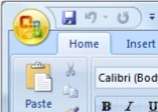
Access Word Options by clicking the Office Button in Microsoft Word (the Office logo in the top-left corner of the window), and click on the Word Options button in the lower-right corner of the menu popup. The Word Options window should display. - Access Proofing Settings
In the Word Options window, access proofing settings by clicking Proofing on the left-side navigation. - Access Grammar Settings
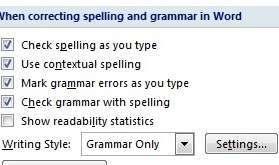
Once you are in Proofing settings, you will find Grammar Settings by clicking the Settings... button next to Writing Style. Writing Style can be found under the Proofing section titled When correcting spelling and grammar in Word.
- Use Only One Space
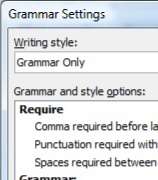
In the Grammar Settings window, the number of spaces after a period is controlled by the option titled Spaces required between sentences. This is set to don't check by default, but options for 1 space and 2 spaces are available. Set this option to 1. - Include a Comma Before the Last Item
Also in the Grammar Settings window, check for commas after and and or through the field titled Comma required before last list item. This is also set to don't check by default, though always and never are available options. Set this option to always.
Additionally, the style checks available through Word's Grammar Settings can also be very helpful. I prefer the "Grammar and Style" writing style option, as it enables all of the style checks. I encourage you to investigate all of these options, as well as enable the comma and sentence options, as they will help you write right like a writer.
At the devLink Technical Conference, one of the Open Spaces focused on Computer Science curriculum at universities, and what things that the developer community would CRUD on the CompSci tradition. Though I did not have opportunity to participate in the discussion—I was facilitating an Open Space on Continuous Integration, next door—I do have one proposal: "Writing." For Computer Scientists—a traditionally introverted and communication-challenged group—programming in English (substitute with your native language) should be paramount. Communicating to humans is part of our job description, and we must be able to do so effectively and using their language, whether it be for status updates, business justifications, SOWs, proposals, or just another email. Developers need to communicate effectively; write well rather than write good. We must be right like a writer.
We programmers should write like we code. The written word should be concise, to the point, just like code. Coders do not frivolously use fancy namespaces and complicated classes so that their code looks smart, as it has the opposite effect by resulting in bloated, inefficient, unmaintainable systems. Big words implemented frivolously for the sake of sounding smart perform the opposite function, and likewise result in bloated, inefficient, unmaintanable text. We avoid power robbers in our code, such as using string builders rather than underperforming string concatenations, and should avoid similar performance kills in our writing. Additionally, using the wrong keyword in code, or misusing grammatical marks in our code, results in compiler errors or runtime errors. The written word—a language void of any compiler benefits—throws runtime exceptions on execution when it is improperly authored, much like JavaScript or XSL.
“Vigorous writing is concise. A sentence should contain no unnecessary words, a paragraph no unnecessary sentences, for the same reason that a drawing should have no unnecessary lines and a machine no unnecessary parts. This requires not that the writer make all sentences short or avoid all detail and treat subjects only in outline, but that every word tell.” — William Strunk
But like a programming language, English is simply a matter of keywords and laws. We must learn the rules of the system; we must learn its syntax; we must learn how to test and validate our code before shipping it off to a client or to production. Approaching the English language like we approach a programming language would also provide an effective learning mechanism for us developer-types. This would make an effective course at university: "Writing : For Programmers." Learn English like we learn any other language—approach it using our virtues—as what works for us may not be the same path that works for an English major.
Throughout my career, I have noticed a few areas that are typically mis-coded. I have included a few items below that every developer should be aware of to help learn English's keywords, its laws, and to provide opportunities to improve end-user experience.
Knowing the Language at an Elementary Level
- Homonyms : words that sound the same but can mean different things. This is often a challenge for people new to English, but even veterans get confused. Everyone should learn the difference, and make proper use a habit. And proof read, as spell check will not catch misuse of homonyms. This applies to:
- Their / There / They're
- To / Too / Two
- Your / You're
- Its / It's
- Hear / Here
- Threw / Through
- Write / Right
- Irregardless is not a word.
- Who vs. Whom : Who, the subject, is doing the acting, and whom, the object, is being acted upon. The shortcut is to use who and whom as you would he and him. (Remember that him and whom both end in "m".) <Who did what to whom for how many jellybeans? He did that to him for five jellybeans.>
- Me vs. I : Follow the same rules as for who vs. whom, above. The subject is doing the acting, and the object is being acted upon. Subject pronouns are I, he, she, we, they, and who. Object pronouns are me, him, her, us, them, and whom. <Sally gave me five dollars. I used to money to buy lunch.>
- Than vs. Then : A comparison (than) vs. a measure of time (then). In code, than is used when describing a comparison operator; the '>' operator is a greater-than operator. In code, time sequences are an if...then statement. <Apples are better than oranges. I will eat my apple first, then I will eat my orange.>
Knowing the Language at a High School Level
- Power Robbers : Never use due to the fact that. It weakens your sentence. Use because.
- Contractions : In formal writing (e.g. Proposals, SOWs), avoid contractions. Contractions are for casual writing. Think along the lines of a Debug Build versus a Release Build.
- Simply & Obviously : Avoid using simply and obviously as it may be both to you, but neither to your audience. If it was simple or obvious, then you didn't need to write it.
- Use one space after a sentence, not two. A PC is not a typewriter. On a typewriter, with fixed-width fonts, two spaces are preferred, but on a PC, True Type fonts will properly space "<dot><space>" for you. Don't believe me? Open up any book and look at the spaces between sentences. Microsoft Word has an option to indicate this for you under grammar preferences.
- Effect vs. Affect : Effect is the result, affect is the action. Noun and verb. <Poor engine performance is the effect of ignored maintenance. Ignoring maintenance affects engine performance.>
Knowing the Language at a Collegiate Level
- Lists : Just like when defining an array, use a comma after every item in a list except the last. This includes before "and." <I like red, white, and blue.>
- i.e. vs. e.g. : The first is in other words and the second is for example, though this does not do much for clarity. Essentially, i.e. is a complete, clarifying list, while e.g. is an incomplete list of examples. <I watch the three stooges (i.e., Larry, Curly, and Moe). I like all four-player card games (e.g., Euchre, Spades, and Hearts).>
- Semicolons : Semicolons are used to separate two independent yet related clauses that could be broken into separate sentences. <The water is very hot; I hope I don't burn myself.> Also, use semicolons to separate items in a list where the items contain commas. <When the cards were dealt, Jack had a straight; Sally had two nines, two fives, and a queen; and George had a full house.>
Be mindful of your native language. It is the one you use the most, even more than C#, or Ruby, or Java. If you don't already own a copy, pick up The Elements of Style by Strunk & White; if you do own a copy, either have it at your desk so you can use it, or give it to someone who will. Effectively communicating with humans, using their rules, will help you have better testing, better design, better requirements, and have a better job. Become an effective English developer, and it will help you be a more effective developer, overall.
Tomorrow night, Thursday, 11 September, I will be speaking at the GLUGnet Flint meeting. We will be discussing Continuous Integration, focusing on CI as a process, not just a toolset. Come out to Flint, enjoy some pizza, and hear about what Continuous Integration can do for your development cycle. Continuous Integration: It's more than just a toolset
Thursday, 11 September, 2008 @ 6:00pm
New Horizons
4488 West Bristol Road
Flint, MI 48507
Session Abstract:
Does your team spend days integrating code at the end of a project? Continuous Integration can help. Using Continuous Integration will eliminate that end-of-project integration stress, and at the same time will make your development process easier. But Continuous Integration is more than just a tool like CruiseControl.Net; it is a full development process designed to bring you closer to your mainline, increase visibility of project status throughout your team, and to streamline deployments to QA or to your client. Find out what Continuous Integration is all about, and what it can do for you.
My summer has been what seems like a
steady stream of major events in the development community. It really
all began with my election to the board of GLUGnet last April, which immediately put me as a
planner for the first Lansing Day of .Net, for which I handled the web site
and branding. The event, which I blogged about previously, was
held on June 21, 2008, and was a huge success. We will definitely have
the conference again next year, and are already brainstorming ways to
make the event even better. Three weeks after LDODN, on July
11-13, was Ann Arbor Give Camp. Give
Camp was an event for charity, where area developers volunteered their
weekend to code for charity. The Heartland District truly displayed
their selflessness and passion with their willingness to endure three
days of Ninjas-On-Fire coding, often sacrificing sleep to accomplish
deadlines, to help out not-for-profits that likely would never have the
budget for a high-quality, professionally developed web site. I was
also impressed by the event sponsors for their donations and
contributions; Washtenaw Community College provided the venue for no cost, Verio
provided free hosting for each charity's site until 2010, and Microsoft
provided to each of the charities free copies of all of the software
needed to support and maintain the new applications. The planning staff
should be commended for this event, too; they went to no end to enable
the development teams, and to meet our every desire. There was plenty
of food, plenty of snacks, plenty of fluids, and plenty of games for
when we needed to occasionally decompress. We requested ice cream; we
got ice cream. Someone on my team even requested a Cherry Coke, and one
of the organizers made a midnight run to the local gas station to pick
up a bottle. The event was great, and we had a blast. I will be there
next year, maybe even running a team of my own. Another four weeks brought CodeStock, August 9, in Knoxville, TN. Dave Redding,
The Wife, and I hopped in Dave's Charger and cruised the nine hours
from Brighton, MI to Knoxville on Friday night, arriving at about
3:30am for the 7:30am registration. Michael Neel and crew put on a great show. I finally got to
see the Joe O'Brian / Amanda Laucher presentation on DSLs and Brian H. Prince's 'Soft Skillz
' talk. (I highly recommend both.) But what really made the event were
the Open Spaces, organized by Alan Stevens. We
had some enlightening discussions, such as improving User Group
participation, and developing in .Net on a Mac. The after party at
Alan's house included a time for socializing outside of a technical
setting, and included a friendly game of Texas Hold'em. Dennis Burton
was the big winner, and graciously donated his winnings to the Hands On
Museum in Ann Arbor, the charity that Michael Eaton worked on during
Give Camp. In the shortest gap of the summer, I only had to wait two more weeks for devLink, August 22-23, in Murfreesboro, TN. However, there was no 9 hour drive, as The Wife and I hitched a ride on the devLink Bus. Organized by Amanda Laucher
(and others)--my employer, Latitude Consulting Group, was also one of
the sponsors--we chartered a coach for the weekend to take some of the
local developers down to devLink. The bus started in Grand Rapids, and
made pick-up stops in Lansing, Detroit, Toledo, Columbus, and
Cincinnati. We made some "detours" along the way, and the seats were a
little uncomfortable for sleeping, but we all had a great time; we had
some great discussion, we watched some movies, and Mike Eaton, The
Wife, Eric Vogel , and I even played a few rounds of euchre. We had one
minor glitch on the return trip, as one of the right rear tires blew
out at about 1:30am while traveling at 65mph up I-71, but we even had
fun on the 3 1/2 hour delay, as we took over a Waffle House in Carrollton, Kentucky, were entertained by "The Great Pork Chop Incident," and a
few riders extended the Open Spaces discussions from the conference. As for devLink itself, I went to focus on the Open Spaces. Four
different Open Space discussions were on hand for each of the session
blocks throughout the two-day conference. I attended sessions on
Developing the Developer Community; on why Comments are Evil; on How
"Should" Changed My Life (a discussion on BDD
, and creating effective tests); on Microsoft, Open Source, and
CodePlex; and I facilitated a discussion on Continuous Integration. I
only went to one session throughout the conference: Jeff Blankenburg's
talk on Silverlight. I challenged him to show me a reason to use
Silverlight that didn't include gradients, spinning ghost animations,
or anything else that I have been able to do in Flash since version 4.
After his talk, I'm actually motivated to dig in. Over the years, I
have created a few Flash games--nothing too special, as they were
primarily about learning a specific component, like collision
detection--and I plan on starting with converting them to Silverlight.
It should give me a good opportunity to grok the space. But to me, the best part about this summer isn't the things I have
learned, or the code I've produced, but the relationships and bonds
that have formed. I have made many new connections this summer, and
made some great new friendships, and I look forward to many more. The
list is made up of people all smarter than I am, yet I am treated as an
equal. Every time we connect, I learn a lot, professionally and
personally. I have grown a lot over this past year, and I owe every bit
of it to them (and to the kick in the pants from Dennis Burton that
pushed me to get involved in the first place). Here's to what's next.
A question
was posed on LinkedIn asking readers if they
used Twitter, and if so, how and why? Because
of the impact that Twitter has had on my life, I felt compelled to
answer. Twitter is a phenomenal tool that I
feel should be included in any developer's toolset. I use Twitter for
both business and personal reasons, including socializing
with friends, scheduling lunch, and also for networking with business
associates. There is
a lot of value in having a consolidated service through which I can
plan both happy hour and a business meeting. I have also made many new
business contacts through the service, and the personal nature of
Twitter communications have created relationships that are much more
solid than those from other services, such as LinkedIn. When I travel
to a conference such as devLink or Codestock, I often meet these
twitter contacts for the first time, yet the bond that has matured on
Twitter makes it seem like we have been friends for a long time. In addition to networking,
Twitter is effective with asking questions and getting quick responses
(similar to what was on LinkedIn), or for driving traffic to my blog by
promoting when there is a new post.
I access Twitter four different ways: through Witty on my primary
computer,
directly through the web when not at my primary computer, through
Twitterific on my iPod Touch, or through SMS on my phone.
The possibilities allow me to stay connected wherever I go. I have a
presence on many of the social networks, too, such a Pownce,
Jaiku, and Identi.ca, but I rely on Twitter. I can't live without it. Do you Twitter? How do you use Twitter? How has it had an impact on you?
Jeff Blankenburg came up with a good idea! As I go through my LinkedIn connections, I see that not many of them have recommendations. And it's not that these people don't deserve them--many of these connections I consider to be amongst the brightest people in the industry. As a community, and in many cases simple as a people, we don't often take the time to help each other out. We may pat each other on the back for recognition of talent, but we don't often do so in a public forum. Social Networking sites like linked in are phenomenal for things like job hunting, not necessarily for the networking but because potential employers will peruse these sites to gather information about a candidate, and these recommendations can go a long way towards impressing the employer. Enter Contribupendence Day! Jeff came up with the idea for one grand call-to-action where the entire community gets together to "tell the world about the people we work with." Everyone should comment / recommend / praise their friends, colleagues, associates on sites such as LinkedIn or Plaxo. No strings attached. No expectation that they will return the favor. Just do a good deed for your buddy, because that's what we should all be doing anyway, everyday. I have a few folks that I have been meaning to recommend, and I just haven't gotten around to it. This is good motivation, and a great idea. You should, too. Today we celebrate our Contribupendence Day.
Our first Lansing Day of .Net has come and gone. Plenty of people are blogging about it. After a stressful final week of creating designs for swag and for attendee badges, buying refreshments, and making last minute schedule changes, the event ran smoothly, and I am quite happy with the outcome. The group did an amazing job putting it all together. We had great attendance, phenomenal sponsorship, and great sessions. Corey Haines stepped in at the last minute for a speaker that was unable to make it, and did a commendable job by any standards, let alone that he assembled the entire talk within 24 hours. Once registration had closed, and things had settled down, I was also able to see sessions by Michael Eaton on Castle ActiveRecord, Jay R. Wren on Castle Windsor, Patrick Steele on Castle MonoRail, and WCF with James Bender, all of which were also well done. It was also great to meet-in-person the people I've been chatting with on Twitter or over the phone while organizing the event, as well as getting to know so many new people. I will see you all again, hopefully with you wearing my Lansing Day of .Net "i was there" t-shirt or drinking beer from my "i think i was there" pint glass! (They, too, turned out exactly as I had hoped.) "Hey. That's my art!" It is very cool to this web developer to see people walking around wearing my artwork. Thank you, again, to all of the organizations that sponsored the event, without whom the event wouldn't happen, to all of the speakers that helped us all learn new things about our craft, and to all of the attendees that made this event worth while. We need to do this again next year!
|